

Snapchat has never been just another social media app—it’s more like a secret club filled with unspoken rules, disappearing messages, and cryptic symbols. Among these digital mysteries, one subtle icon continues to baffle even the most loyal users: the little eye icon next to your Snapchat Story. If you’ve ever stared at it and wondered, “What do the eyes mean on Snapchat Story?”—you’re not alone.
In this in-depth breakdown, we’re going to decode this feature, explain what it actually tells you, and give you a few savvy ways to use it to your advantage. Buckle up, because the eyes aren’t just for looking—they’re for watching who’s watching you.
What Do the Eyes 👀 Mean on Snapchat Story?
Let’s cut to the chase. If you’re seeing that little eye symbol next to your Story and curious to know what 👀 means in Snapchat story, you’re likely using Snapchat+, the platform’s paid premium subscription.
The eyes icon appears when someone has rewatched your Story. That’s right—Snapchat is literally letting you know when your content is compelling enough for a double-take.
So, what does 👀 mean in Snapchat Story? In plain terms:
- It means someone viewed your Story more than once.
- The number next to the icon indicates how many people rewatched it—not how many times it was rewatched.
- You won’t see who rewatched it, just how many did.
Credit: Grok
Only Snapchat+ Subscribers Get the Tea
Is the eyes icon part of Snapchat+? Yes, regular Snapchat users won’t see this rewatch metric. It’s a Snapchat+ exclusive, part of a suite of premium features designed to offer deeper insights. That’s right—if you’re not subscribed to Snapchat+, those mysterious eyes won’t show up at all. But for subscribers, it’s a mini analytics tool that feeds your inner social media detective.
So again, if you’re asking “what do the eyes mean on Snapchat Story?”—it’s a subscriber-only feature showing rewatch count, not view count, and not individual rewatchers.
When and Where Do the Eyes Icon Appear?
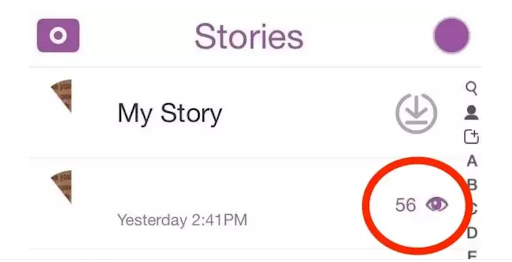
The eye icon on Snapchat Stories is a neat little feature that only appears if you’re a Snapchat+ subscriber. It shows up next to the number of views on your Story, indicating that someone has rewatched your content.
Instead of just telling you how many times your Story has been viewed, the eyes icon gives you an extra level of insight by showing how many people have rewatched it.
You’ll typically spot the eye icon in the Viewers section of your Snapchat Story. Once your Story has been viewed, you’ll see a list of people who’ve watched it.
If anyone rewatched it, a small eye icon will appear next to the number of rewatchers, and the number displayed will tell you how many viewers have gone back for a second look.
How To Enable and Disable the Rewatch Indicator Feature?
Enabling or disabling the rewatch indicator feature is fairly straightforward:
- Open Snapchat: Start by opening your Snapchat app on your mobile device.
- Go to Settings: Tap your profile icon in the top-left corner, and then hit the gear icon to open the settings menu.
- Find Snapchat+ Settings: Scroll down to find the “Snapchat+” section and tap it.
- Manage Features: In the Snapchat+ settings, look for the “Story” settings, which include the rewatch indicator option.
- Enable or Disable: You’ll see an option for the “Rewatch Indicator.” Toggle it on to enable the eyes icon feature or off to disable it.
When you disable it, you won’t see the eye icon anymore, and rewatch data won’t show up on your Stories. You’ll still get the number of views, but not the rewatch breakdown.
How to Use the Eyes Icon to Your Advantage?
Now that you know what do the eyes mean on Snapchat Story, here’s why it’s a big deal:
- You can gauge interest in your content. If you see a higher number of eyes, your content is probably resonating.
- It helps with content strategy. If your food pics get more rewatches than your dog videos, maybe it’s time to pivot your brand?
- Curiosity control. You can’t see who’s rewatching, but just knowing someone is? It’s the ultimate compliment—or maybe even a red flag.
What the Rewatch Count Actually Tells You
How does the Rewatch Indicator work on Stories? The Rewatch Count only tracks replays, not viewers. The number beside the eyes icon only means how many times the video was watched, rather than how many people watched it.
It could either be one person watching it three times or multiple people watching it once.
No option to know who rewatched. Does the eye icon mean someone is watching you? Yes, but no option to know who. Snapchat keeps that private.
Can You See Who Rewatched Your Story on Snapchat?
Who’s rewatching you? You’ll never know. Sorry, true detective—you don’t get to know exactly who rewatched your Story. Snapchat keeps that detail confidential. This is a great move for privacy, but also a subtle reminder: you’re being watched, even if you don’t know by whom.
So the next time you’re wondering “what do the eyes mean on Snapchat Story,” know this: they mean someone is intrigued. You’re sparking curiosity. You’re making waves. Or, you know, maybe your meme hit just right.
 Credit: Social Champ
Tips to Get More Rewatches (a.k.a. More Eyes)
If the eye icon has activated your inner influencer, here’s how to keep those eyes coming:
- Tell a story, not just a snap. Think mini-series, not random uploads.
- Use text to tease. Leave your followers wanting more.
- Time it right. Early evening and late-night snaps tend to get the most engagement.
- Engage with your audience. Use polls, questions, or shoutouts to make viewers feel involved.
- Make it relatable. Rewatch-worthy content is often emotional, funny, or bizarre in a good way.
Snapchat+ Breakdown: Is It Worth Paying for the Eyes?
Here’s a quick peek at what Snapchat+ gets you beyond just the rewatch count:
- Priority Story replies
- Story Boost
- Custom app icons
- Ghost Trails (see where friends have been)
- Best Friends Forever (pin your top BFF)
If these features excite you, the subscription (around $3.99/month) might just be worth the eyes alone. Especially if you’re asking yourself “what do the eyes mean on Snapchat Story” five times a day.
 Credit: Martech
FAQ: Understanding the Eyes on Snapchat
1. How do you see who the 👀 are on Snapchat?
You can’t see exactly who rewatched your Story. Snapchat+ users only see how many people rewatched, but not who specifically.
2. How do you tell who rewatched your Snapchat Story?
You can’t see who rewatched your Story. Snapchat+ shows a count of how many rewatched, but not individual users.
3. What do the 2 eyes mean on Snapchat Story?
Two eyes mean two people rewatched your Story. The number next to the eyes shows how many different viewers rewatched it.
4. What do the eyes mean on Snapchat Premium?
The eyes on Snapchat Premium indicate how many people have rewatched your Story. This feature is available only to Snapchat+ users.
5. What does the eye emoji mean on Snapchat?
The eye emoji indicates rewatch activity on a Story. It shows how many people have rewatched, but doesn’t identify who.
All Eyes on You: The Final Word on Snapchat’s Most Mysterious Icon
So, what do the eyes 👀 mean on Snapchat Story? In a nutshell: they’re Snapchat+’s way of giving you a nod when someone can’t get enough of your content. It’s not about vanity (okay, maybe a little), but about engagement, curiosity, and crafting Stories worth replaying.
Whether you’re a casual Snapper or a content kingpin, understanding what those eyes mean gives you a small but powerful glimpse into your digital influence. Keep them watching, keep them guessing, and above all—keep snapping.
Want help turning your Snapchat game into a personal brand empire? Ask me how to optimize content strategies for Snapchat+, or get more eyes on your Stories starting today.